
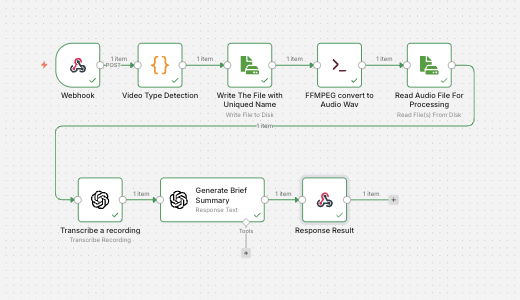
If you’re building an “AI content” workflow—turning videos into transcripts, summaries, and publishable content—the most common bottleneck is not the AI model. It’s the media processing step in the middle.
Many teams solve “video → audio” by adding another external API. It works, but it also adds latency, cost, and extra failure points. A simpler and faster pattern is to use a native command locally (such as FFmpeg) to extract clean audio first, then send that standardized audio into transcription.
The problem with raw video inputs
Videos arrive in many shapes:
- MP4, MOV (QuickTime), and other containers
- Different codecs, audio channels, sample rates
- Inconsistent or missing file extensions (especially when sent as binary)
When you feed raw video directly into downstream nodes, you end up troubleshooting issues like “wrong mime type,” “file extension mismatch,” or inconsistent transcription results because the audio properties vary.
The concept: normalize first, then transcribe
A robust pipeline follows a simple principle:
Normalize audio once at the beginning, so everything after becomes predictable.
In n8n, this fits naturally into a workflow that can accept input from multiple sources:
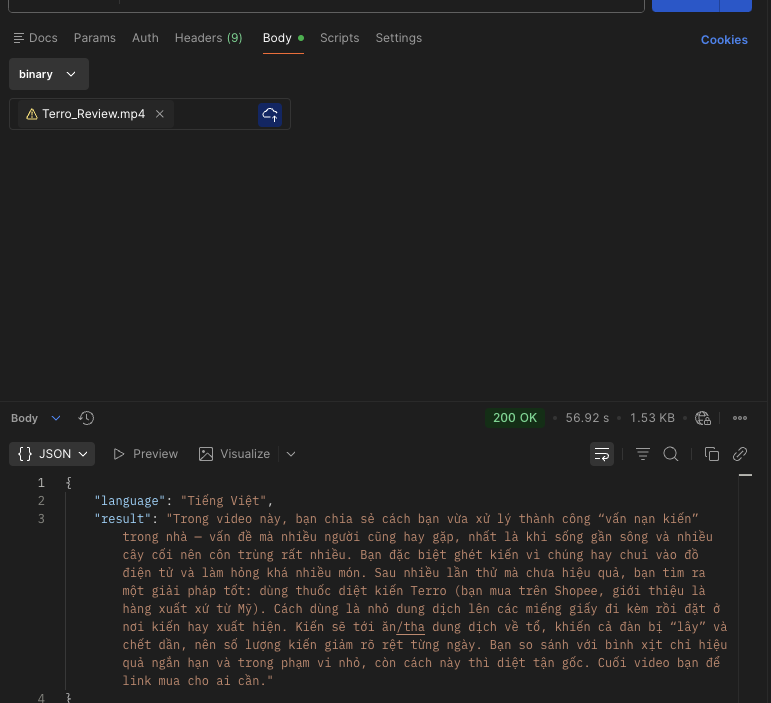
- Webhook upload: apps or systems POST the video binary directly
- Drive pick-up: new files dropped into a folder trigger processing
- Manual upload: for ad-hoc processing or internal ops
No matter where the video comes from, the same processing steps apply.
A practical flow in n8n (high level)
A typical implementation looks like:
- Ingest video (Webhook / Drive / Manual)
- Detect file type and fix naming
Light detection helps when a QuickTime file arrives with an unexpected extension or when container metadata isn’t obvious from the filename. - Write the video to disk (temporary workspace)
- Run a native conversion command (FFmpeg)
Extract the audio into a stable transcription format. - Read the audio file and transcribe
- Post-process (language detection, brief summary, structured output)
- Return results (immediate webhook response or store for later)
Why native conversion is the better performance option
Lower latency: Local conversion avoids sending large video payloads to another service and waiting for processing.
Lower cost: You avoid paying “conversion as a service” fees on top of transcription and LLM usage.
Higher reliability: Fewer vendors and fewer network calls means fewer timeouts, rate limits, and intermittent failures.
More consistent quality: Normalizing audio (for example, mono + a consistent sample rate) tends to produce more stable transcripts, especially when videos come from many sources.
Recommended audio normalization baseline
For speech transcription, a common baseline is:
- WAV
- Mono (1 channel)
- 16kHz sample rate
The key is not perfection—it’s consistency.
Final takeaway
If your end goal is transcription and AI-generated content, treat video-to-audio conversion as infrastructure. Using a native command like FFmpeg inside your n8n runtime is often the simplest way to improve speed, reduce cost, and make your workflow resilient to messy real-world inputs.
Once audio is standardized, transcription and summarization become straightforward—and your pipeline moves from “demo quality” to something you can run reliably in production.
 Le Nguyen's Blog