
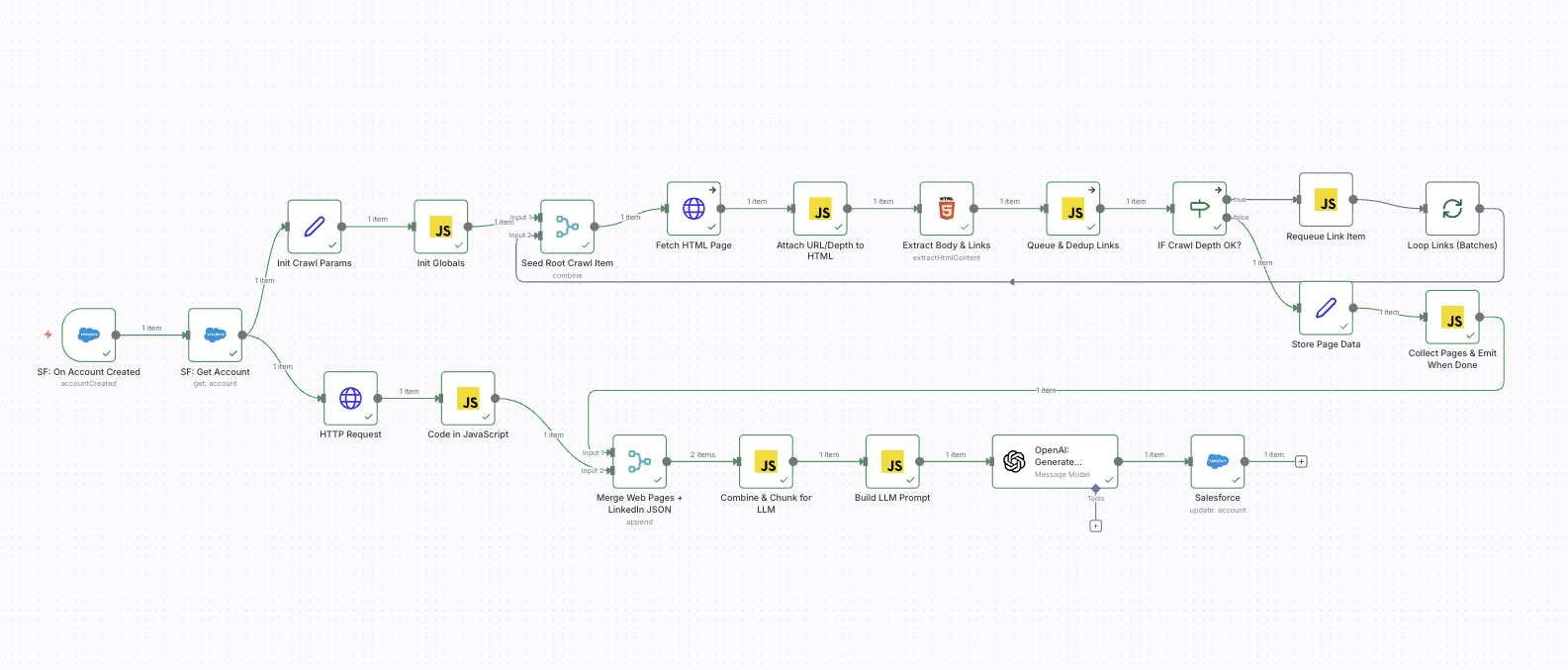
If you have ever tried to keep Salesforce Account data clean and complete, you already know the pattern: new Accounts arrive with only a website field, the team needs basic company context, and enrichment becomes a manual process that never quite stays up to date.
A practical alternative is to make enrichment part of the Account lifecycle:
- When an Account is created (or updated), automatically collect reliable company context.
- Combine first-party website content with PredictLeads’ structured company intelligence.
- Generate a consistent “company profile” that is easy for humans to read and easy for systems to use.
- Write it back to Salesforce (or any CRM) as clean, structured fields.
This article outlines a production-friendly approach using n8n and the PredictLeads API, aligned to the workflow you shared.
Why combine website crawling with PredictLeads?
Each source solves a different problem:
Website content is “ground truth” for messaging
A company’s own website typically provides the clearest description of:
- What they do and how they position themselves
- Product/service categories and terminology
- Contact and About pages (emails/phones/locations when published)
The downside is that websites are unstructured and vary wildly.
PredictLeads adds structure, consistency, and relationships
PredictLeads returns normalized company attributes keyed by domain (e.g., company name, location, descriptions, and company relationships like subsidiaries and lookalikes). That structure is what makes automation reliable: you can map fields predictably into Salesforce and build downstream processes on top of them.
Together, they produce better enrichment than either alone
A light website crawl gives you precise context; PredictLeads gives you dependable structure. The result is a richer, more accurate company profile—without requiring a human to research each account.
High-level workflow
A clean enrichment flow can be summarized as:
- Trigger on a CRM event
Example: “Account Created” in Salesforce. - Read the Account record
Pull the Account Website/domain and any existing fields that can help. - Call PredictLeads using the domain
Fetch the normalized company record. - Crawl the company website (lightly)
Depth 1 is usually enough: homepage + a handful of top-level pages. You are mainly looking for About/Contact/Services signals. - Merge all data into a single “source bundle”
PredictLeads JSON + website text content (and optionally existing CRM fields). - Normalize into a consistent output schema
Use an LLM (or deterministic rules where possible) to produce:- a structured company insight JSON object
- a concise summary
- a confidence rating
- optionally, an HTML “rich text” summary for Salesforce
- Update Salesforce
Write the enriched fields back to the Account.
This is exactly what your n8n flow is doing: it treats enrichment as an automated pipeline, not a one-time import.
What you get back (practical enrichment fields)
A good enrichment output should be opinionated and consistent. In your flow, the target schema includes:
- Domain
- Company name
- Industry
- Summary (5–7 factual sentences)
- Services (a short list)
- Email / phone (when publicly available)
- Headquarters and other locations
- About URL and contact URL
- Confidence rating (0–100)
- Rich text insight (HTML for easy viewing inside Salesforce)
This is a strong schema because it balances:
- CRM field updates (name, industry, phone, description)
- Human readability (summary + HTML insight)
- Data quality discipline (nulls/empty arrays + explicit confidence)
How the n8n implementation works (mapped to your flow)
1) Salesforce trigger and Account fetch
You begin with a Salesforce Trigger node (“On Account Created”), then a Salesforce “Get Account” node. This ensures you are enriching the full record, not just the trigger payload.
Practical note: if enrichment should run on changes to Website as well, consider also triggering on “Account Updated” with a condition “Website changed”.
2) PredictLeads API request
You call the PredictLeads endpoint using the Account Website as the key.
Best practice: store credentials in n8n credentials or environment variables—avoid hardcoding tokens in workflow JSON. This keeps secrets out of exports, logs, screenshots, and shared templates.
Example pattern:
GET https://predictleads.com/api/v3/companies/{domain}
3) Lightweight crawl of the company website
Your flow seeds a root URL, fetches HTML, extracts body text and links, and queues internal links up to a max depth of 1.
This is the right tradeoff for enrichment:
- It is fast
- It captures the most important top-level pages
- It avoids crawling the whole site (which increases noise and runtime)
4) Merge: PredictLeads JSON + website pages
You merge the PredictLeads response (structured) with website pages (unstructured), then combine content into batches that fit model limits.
Your “Combine & Chunk for LLM” step is important because it prevents the enrichment step from failing on large pages and keeps the system stable in production.
5) LLM normalization with a strict schema
Your prompt design includes several production-grade choices:
- “Pure JSON only” output constraint
- “Never invent data” rule
- Explicit merge preference: website values first, then PredictLeads, then CRM
- Confidence rating tied to data completeness and consistency
- HTML-ready insight content for Salesforce display
This is exactly how you keep enrichment consistent over time.
6) Write enriched fields back to Salesforce
Finally, you update the Account fields like:
- Name
- Industry
- Phone
- Description (summary)
A common enhancement is to write the HTML “rich_text_insight” into a dedicated Rich Text Area field (e.g., Company_Insights__c) so users can see the enrichment without overwriting the standard description.
Best practices that make this reliable in production
1) Normalize the domain early
Websites can appear as:
example.comhttps://example.com/www.example.com
Normalize to a clean domain string for PredictLeads, and store it on the Account (e.g., Domain__c) so enrichment is consistent.
2) Add retry and fallback behavior
Web requests fail. Plan for:
- timeouts
- transient 5xx errors
- empty responses
In n8n, use “Continue on fail” where appropriate and route errors into a monitoring path (Slack/Email/log record).
3) Cache enrichment results
If the same domain appears repeatedly (common in lead imports), cache the PredictLeads response in a simple datastore (Redis, DB, or even n8n static data with TTL discipline) to reduce cost and latency.
4) Separate “raw” and “final” fields
Keep a place for:
- raw PredictLeads JSON (for audit/debug)
- raw website text (optional)
- final normalized “Company Insight” fields
This makes troubleshooting and data governance much easier.
5) Make confidence actionable
A confidence score is most useful when you operationalize it:
- If rating < 50, route to a manual review queue
- If rating ≥ 80, allow automatic overwrite of specific CRM fields
- If rating is medium, update only non-destructive fields (e.g., summary, insights field) but avoid overwriting Name/Industry
A simple way to describe the value
When this pipeline is running, your team stops asking “Can someone research this account?” because the system can produce:
- A clean summary of what the company does
- Consistent industry/services tags
- Locations and contact signals when available
- A confidence score that tells you how trustworthy the profile is
And it all happens automatically, the moment the Account enters your CRM.
 Le Nguyen's Blog