
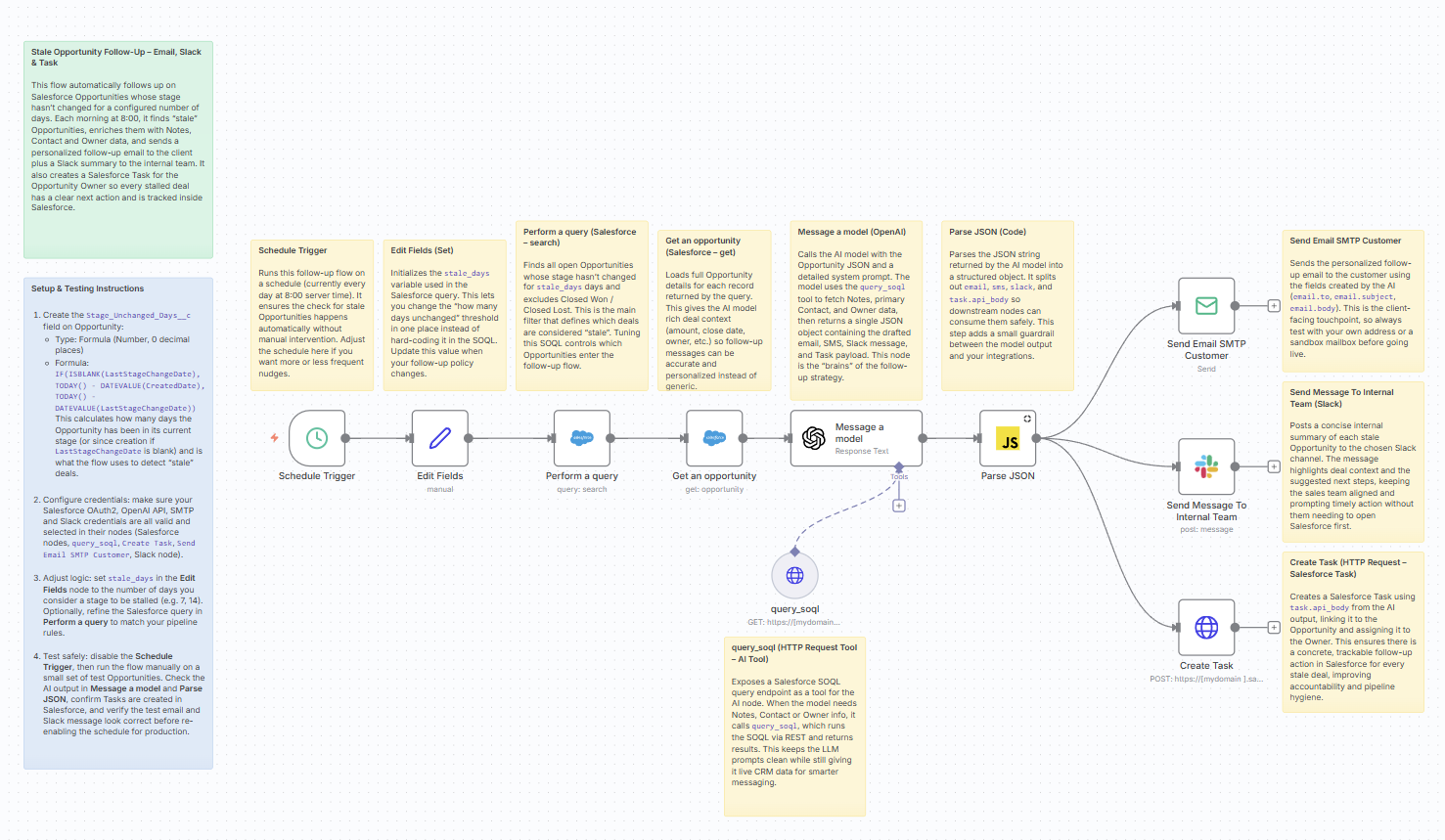
When your pipeline is full, the easiest deals to lose are the ones that go quiet. Picture this: an automotive dealership quotes a 2025 Honda CR-V to a hot lead. The client loves the car but wants to “think about the monthly payment.” A week passes, then two. The salesperson gets busy, forgets to follow up, and the buyer walks into a competitor’s showroom instead. This automation prevents exactly that: every morning it scans Salesforce for stalled opportunities, pulls real context (notes, contact, owner), and automatically sends a personalized follow-up email, posts a Slack reminder, and creates a Salesforce Task so the deal doesn’t die in silence.
Download Here: https://www.crmaiinsight.com/flows/stale_deals_alert.json
What this workflow does (high-level)
This n8n template turns “I’ll follow up later” into a reliable daily habit:
- Every morning at 8:00 – n8n runs automatically.
- Finds ‘stale’ Opportunities – based on
Stage_Unchanged_Days__cand excluding Closed Won / Closed Lost. - Loads full Opportunity details from Salesforce.
- Asks OpenAI (GPT-5.1 in this case) to:
- Query Salesforce Notes, primary Contact, and Owner using a tool (
query_soql) - Draft:
- A follow-up email to the client
- A short SMS template
- A Slack summary for the internal team
- A Task payload for Salesforce
- Query Salesforce Notes, primary Contact, and Owner using a tool (
- n8n then:
- Sends the email (SMTP)
- Posts the Slack message (sales channel)
- Creates the Task in Salesforce via REST API
End result: no stale deal is left without a nudge and every follow-up is recorded as a Task.
Prerequisites
You’ll need:
- A Salesforce org with:
- Custom field
Stage_Unchanged_Days__c(Formula Number) on Opportunity - Opportunity stages including
Closed WonandClosed Lost
- Custom field
- Salesforce OAuth2 credentials in n8n (
salesforceOAuth2Api) - OpenAI credentials (
openAiApi) - SMTP credentials for outbound email
- Slack app / bot +
slackApicredentials - n8n instance (self-hosted or cloud)
Recommended Stage_Unchanged_Days__c formula
In Salesforce (Setup → Object Manager → Opportunity → Fields & Relationships):
- Field Label: Stage Unchanged Days
- Data Type: Formula (Number, 0 decimal places)
- Formula:
IF(
  ISBLANK(LastStageChangeDate),
  TODAY() - DATEVALUE(CreatedDate),
  TODAY() - DATEVALUE(LastStageChangeDate)
)
This is what the flow uses to detect stale deals.
Node-by-Node Walkthrough
Below is the flow you shared, with names aligned to the blog so someone can follow your template screenshot by screenshot.
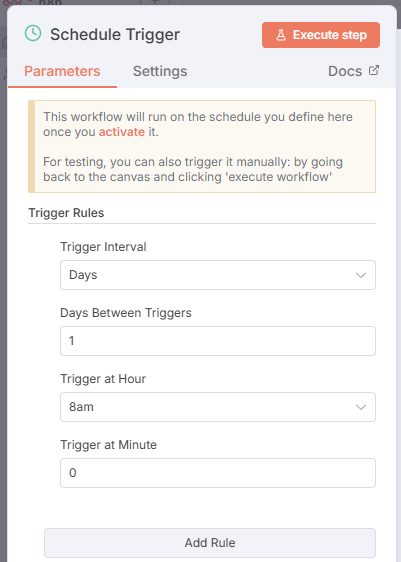
1. Schedule Trigger – run every morning
Node: Schedule Trigger
- Runs daily at 08:00.
- Kicks off the entire stale-deal scan.
2. Edit Fields – set the stale days threshold
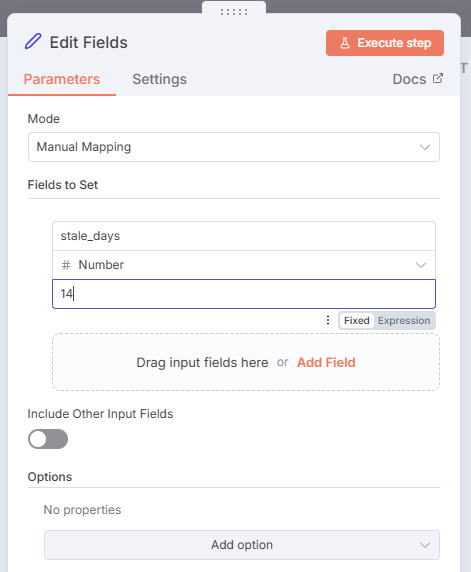
Node: Edit Fields (Set)
- Sets
stale_days(Number) to your chosen threshold (e.g., 7, 14). - Makes it easy to change the policy in one place instead of editing SOQL.
stale_days = 0 // For testing; change to 7 or 14 in production
3. Perform a query – find stale Opportunities
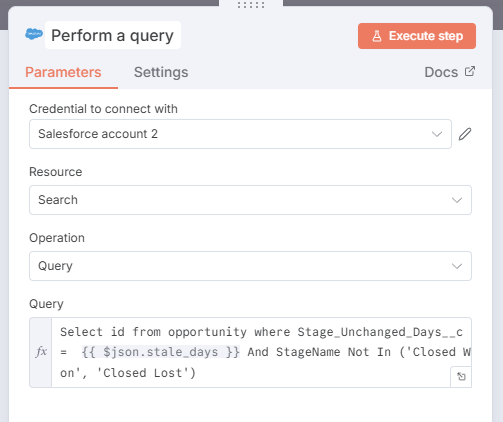
Node: Perform a query (Salesforce → resource: search)
SOQL:
Select id
from opportunity
where Stage_Unchanged_Days__c = {{ $json.stale_days }}
  And StageName Not In ('Closed Won', 'Closed Lost')
- Returns only open Opportunities that have been in the same stage for exactly
stale_daysdays. - This defines what counts as “stale”.
4. Get an opportunity – load full deal context
Node: Get an opportunity (Salesforce → resource: opportunity, operation: get)
OpportunityId = {{ $json.Id }}from the search node.- Fetches full fields:
Name,AccountId,StageName,Stage_Unchanged_Days__cAmount,CloseDate,Type,LeadSourceOwnerId,IsClosed,IsWon, etc.
This gives the AI enough context to write deal-specific follow-up messages.

5. query_soql – give the AI live access to Salesforce
Node: query_soql (HTTP Request Tool)
- URL:
https://<yourInstance>.my.salesforce.com/services/data/v64.0/query/ - Auth:
salesforceOAuth2Api - Query parameter:
={{ /*n8n-auto-generated-fromAI-override*/ $fromAI('parameters0_Value', ``, 'string') }}
In the Message a model node, this is described as a tool:
query_soql(soql: string)- Used by the model to run SOQL queries, for example:
- Notes on the Opportunity
- Primary Contact on the Account
- Owner (User) record

6. Message a model – the AI “brain”
Node: Message a model (OpenAI / LangChain)
- Model:
gpt-5.1 - System prompt (you’ve already written) includes:
- Detailed instructions on:
- Role: Salesforce Sales Follow-Up Assistant
- Input: full Opportunity JSON (
{{ JSON.stringify($json) }}) - How to call
query_soqlthree times:- Notes
- Contact
- Owner
- Communication logic for Open / Closed Won / Closed Lost
- Style guidelines for:
- SMS
- Slack message
- Instructions to construct:
emailsmsslacktask+task.api_body
- Detailed instructions on:
The model responds with one JSON object in the exact schema you defined.

7. Parse JSON – make the AI result usable
Node: Parse JSON (Code)
return JSON.parse($input.first().json.output[0].content[0].text)
- Converts the model’s raw text into a structured object.
- After this node, you can access:
email.to,email.subject,email.bodysms.to,sms.bodyslack.messagetask.api_body.Subject,task.api_body.OwnerId, etc.

8. Send Email SMTP Customer – contact the client
Node: Send Email SMTP Customer (Email Send)
- From:
=le.nguyen@crmaiinsight.com(or your address) - To:
={{ $json.email.to }} - Subject:
={{ $json.email.subject }} - Body (text):
={{ $json.email.body }}
The email body is already formatted with \n\n for paragraphs, following your style guidelines (friendly, concise, value-driven).

9. Send Message To Internal Team – keep sales in the loop
Node: Send Message To Internal Team (Slack)
- Channel: your sales / deals channel
- Text:
={{ $('Parse JSON').item.json.slack.message }}
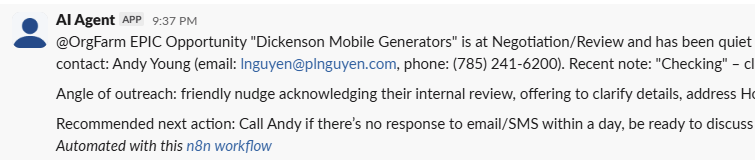
The Slack message usually includes:
- Opportunity name, Stage, Amount, Close Date, Stage_Unchanged_Days__c
- Contact / Account name (if available)
- Notes summary + follow-up angle (“pricing concern”, “waiting on contract”, etc.)
- Recommended next internal action (“Call Alex today”, “Review revised finance options”, etc.)

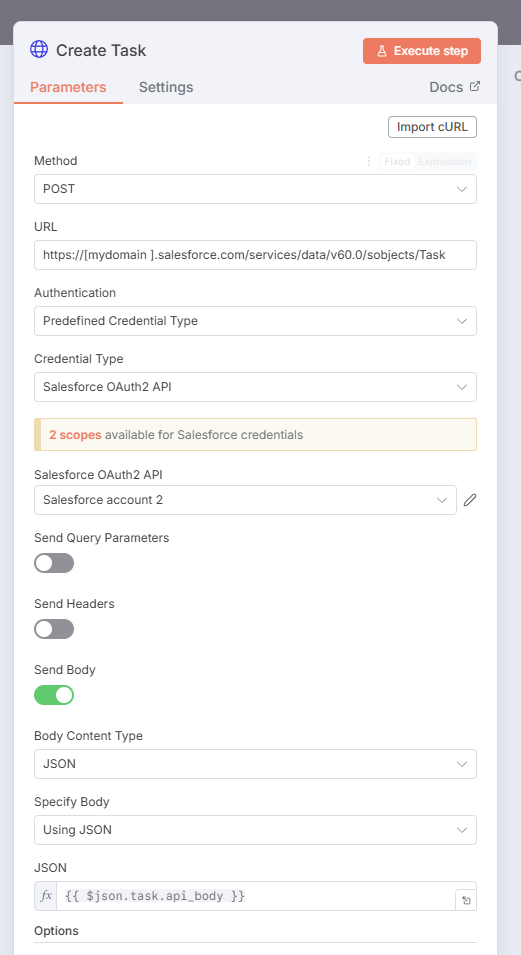
10. Create Task – record the follow-up in Salesforce
Node: Create Task (HTTP Request)
- Method:
POST - URL:
https://<yourInstance>.my.salesforce.com/services/data/v60.0/sobjects/Task - Auth:
salesforceOAuth2Api - JSON Body:
={{ $json.task.api_body }}
The task.api_body object generated by the AI includes:
Subject– e.g. “Follow up on stalled opportunity – 2025 Honda CR-V EX-L – Alex Tran”Description– why the task was created, key note highlights, and the gist of email/SMSStatus–"Not Started"Priority–"Normal"or"High"OwnerId– Opportunity Owner or Owner.IdWhatId– Opportunity Id
Now every stale deal has a Task, giving managers visibility and reps a clear to-do.
Setup & Testing Checklist
Use this as a quick-start for someone importing your flow:
- Create
Stage_Unchanged_Days__con Opportunity- Use the formula above.
- Configure credentials in n8n
- Salesforce OAuth2 on all Salesforce / HTTP Request nodes
- OpenAI on Message a model
- SMTP on Send Email SMTP Customer
- Slack API on Send Message To Internal Team
- Set your real
stale_daysthreshold in Edit Fields (e.g., 7 or 14). - Disable the Schedule and run manually first:
- Check the AI output in Message a model and Parse JSON
- Verify email + Slack content
- Confirm Tasks are created correctly in Salesforce
- When happy, enable the Schedule Trigger and let it run daily.

How this helps real businesses (beyond the demo story)
Back to that car dealership example: instead of relying on each rep’s memory, the system now:
- Spots deals that have stalled for 7+ days
- Reminds the rep in Slack with rich context (“customer concerned about payment; asked for revised quote”)
- Sends a friendly, non-pushy email to the client
- Logs a Task so a manager can see if follow-up actually happens
You can use the same pattern for:
- B2B SaaS trials that go quiet after demo
- Enterprise RFPs stuck waiting on legal
- Service quotes (insurance, energy, consulting) where clients “need to think about it”
Anywhere deals age silently, this flow turns that into a structured, consistent follow-up process.
Want a fully Salesforce-native (Agentforce) version?
This article focuses on n8n + OpenAI + Salesforce—great when you want a flexible, multi-system automation layer.
If you prefer a 100% Salesforce Agentforce solution (using:
- Agentforce prompts for the messaging,
- Flow / Orchestration for stale-deal detection and Task creation,
- Native Slack / email actions inside Salesforce),
there is also an Agentforce-native version of this “Stale Deals Alert + Auto Task” pattern.
👉 If you’d like the Agentforce-only design and prompt, just request it and I can share that version too.
 Le Nguyen's Blog