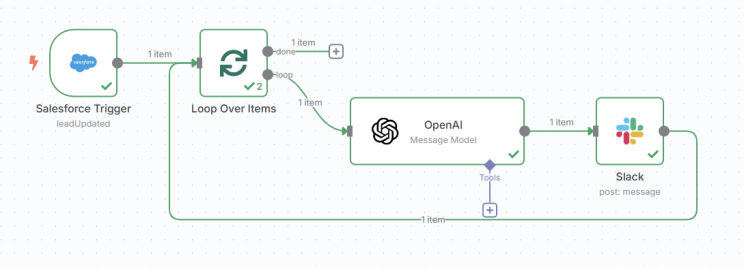
Why it clicked for me — As a Salesforce Architect & Senior Developer, I wired up Salesforce ➜ GPT‑4o ➜ Slack in just a few minutes thanks to n8n’s drag‑and‑drop canvas and built‑in AI nodes—while retaining full control of my data.

What’s n8n?

  • Self‑hosted, Apache‑2.0 OSS — run on Docker, k8s, or desktop.
  • 400+ connectors — Salesforce, HubSpot, HTTP, databases, webhooks, etc.
  • AI‑powered nodes — OpenAI & LangChain built‑in (embeddings, tool calling, RAG).
  • Visual + code — drag‑and‑drop logic, add JS snippets when you need custom sauce.
  • Git‑friendly — workflows are plain JSON; commit‑push‑deploy like any code.

Sample Use‑Case: AI Lead Scoring → Slack DM

[Salesforce Trigger] → [OpenAI (GPT‑4o)] → [Slack]
  1. Salesforce Trigger — fires on leadUpdated.
  2. OpenAI Node — GPT‑4o returns JSON { score, grade, reasons[], next_action }.
  3. Slack Node — delivers Score {{score}} • Grade {{grade}} • Next: {{next_action}} to the owner.

Assumptions: You already have Salesforce, Slack, and OpenAI credentials at hand. Most of the build is drag‑drop and prompt tweaking.

docker run -it -p 5678:5678 \
  -e OPENAI_API_KEY=sk‑… \
  -e N8N_ENCRYPTION_KEY=$(openssl rand -hex 16) \
  n8nio/n8n:latest

Open http://localhost:5678, create creds, drop nodes, hit Activate.
Extend with branches to HubSpot, email, or Postgres—all on the same canvas.

Give n8n a spin and let me know what automations you build! 🚀